
Piezo vs MEMS Vibration Sensors: PCB Signal Chains
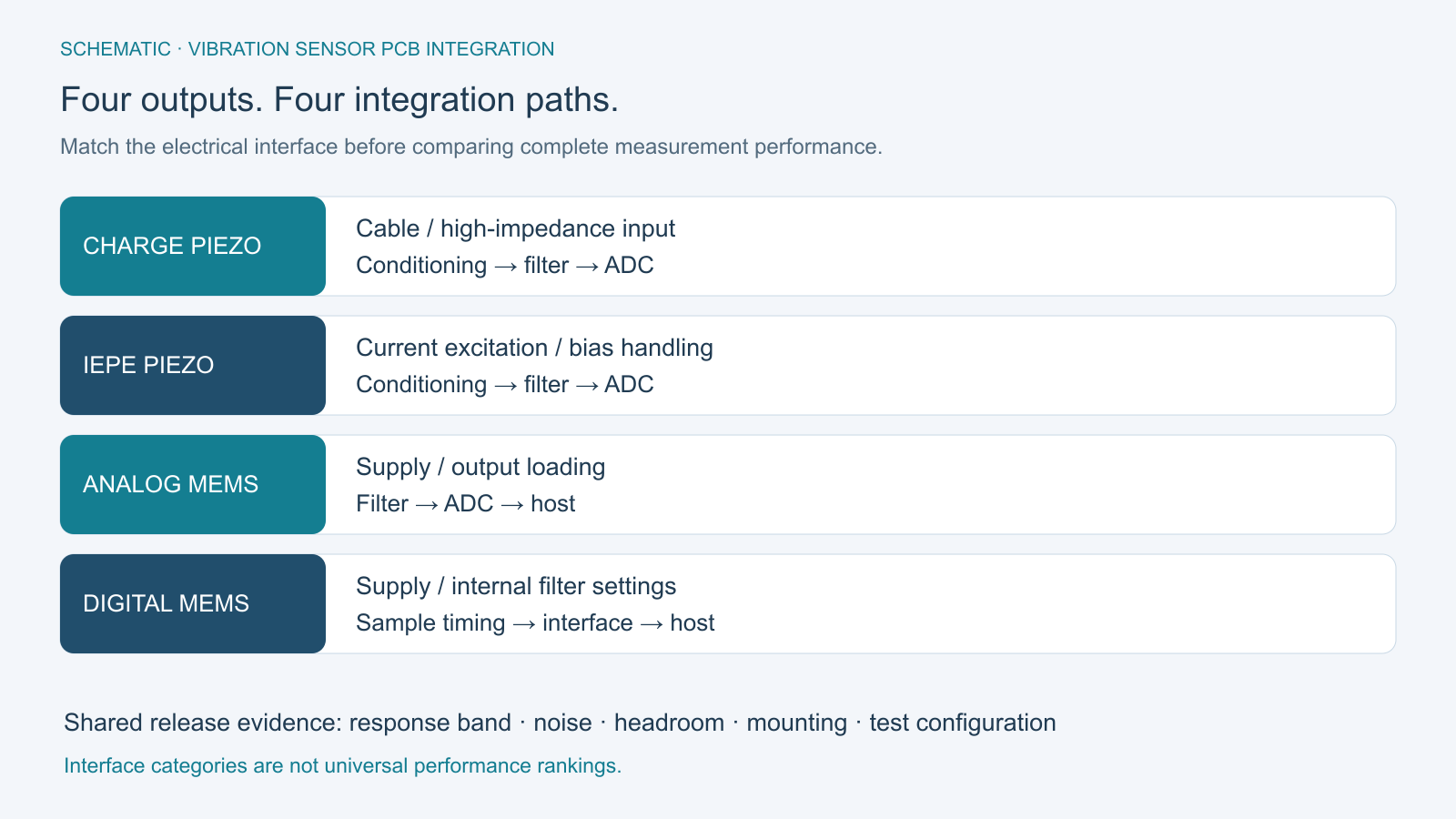
Table of Conent
Table of Conent
Piezo vs MEMS vibration sensors is a useful comparison only after the measurement band, acceleration range, noise allowance, and installation are defined. For PCB integration, compare complete signal chains: a charge-output piezoelectric sensor, an IEPE sensor with built-in electronics, an analog-output MEMS accelerometer, or a digital MEMS device. Each creates different power, conditioning, filtering, and test requirements.
Choose the candidate that can demonstrate the required response in the finished assembly. A wide sensor bandwidth does not establish a flat measurement band; a digital interface does not remove sampling limits; and a good electrical test does not prove that the mounting transfers machine vibration correctly. Those boundaries matter more than a blanket claim that either technology is better.
Define the vibration measurement before choosing a technology
Write a measurement requirement that names the quantity, frequency band, amplitude convention, and allowed error. “Detect vibration” is too broad to select a sensor or accept an assembled board.
State whether the output is acceleration, a band-limited trend, or an input to a diagnostic algorithm. Distinguish peak, peak-to-peak, and RMS values. If the system reports velocity derived from acceleration, define the conversion and filtering instead of comparing an acceleration noise specification directly with a velocity alarm limit.
Identify the smallest useful signal and the largest expected event, including startup, handling, and other conditions that may overload the measurement. Define the relevant axes and installation location. A sensor that resolves a quiet signal can still clip during a transient; a high-range part can still miss the small feature that motivated the monitor.
Conventional piezoelectric measurement systems serve dynamic signals. A DC-capable capacitive MEMS device can also retain a static acceleration response, provided the configured signal path preserves it. In this comparison, “MEMS” refers to the capacitive devices being evaluated, not a promise that every microfabricated sensor has identical behavior. Use the actual model and interface as the procurement identity.
Match the sensor output to the complete PCB signal chain
Choose the front end from the sensor’s electrical output, not its technology label. The input circuit must match the excitation, impedance, offset, and protection requirements of that output.
The PCB Piezotronics signal-conditioning guide distinguishes high-impedance charge outputs from internally amplified, constant-current-powered sensors. ICP is that manufacturer’s trademark; IEPE describes the broader interface category. Neither should be confused with an ordinary low-voltage ADC input.
| Candidate output | PCB path to define | Evidence before release |
|---|---|---|
| Charge-output piezoelectric | Suitable charge or high-impedance conditioning, cable interface, leakage control, and protection. | Gain and drift with the approved cable, input condition, and assembly process. |
| IEPE piezoelectric | Specified constant-current excitation, compliance/headroom, signal bias handling, and ADC interface. | Bias, signal swing, and response with the intended sensor and cable load. |
| Analog capacitive MEMS | Supply and reference arrangement, output loading, analog filtering, and conversion. | End-to-end gain, offset, noise, and usable frequency response. |
| Digital capacitive MEMS | Supply/interface levels, filter configuration, data-ready handling, and data transport. | Correct configuration and continuous, correctly timed samples at the required settings. |
For charge inputs, cable motion, insulation, and contamination can affect the result. For IEPE, check the selected sensor’s current and voltage limits alongside cable capacitance and signal amplitude. Do not copy one excitation value into every product or assume that a long cable is electrically invisible.
Document what the connector can encounter during assembly and installation, then select protection compatible with the measurement. An input that survives a wiring fault but introduces unacceptable leakage, capacitance, or recovery time has not met the complete requirement. Keep the protection review tied to the front-end design.
Budget noise over the bandwidth you will actually use
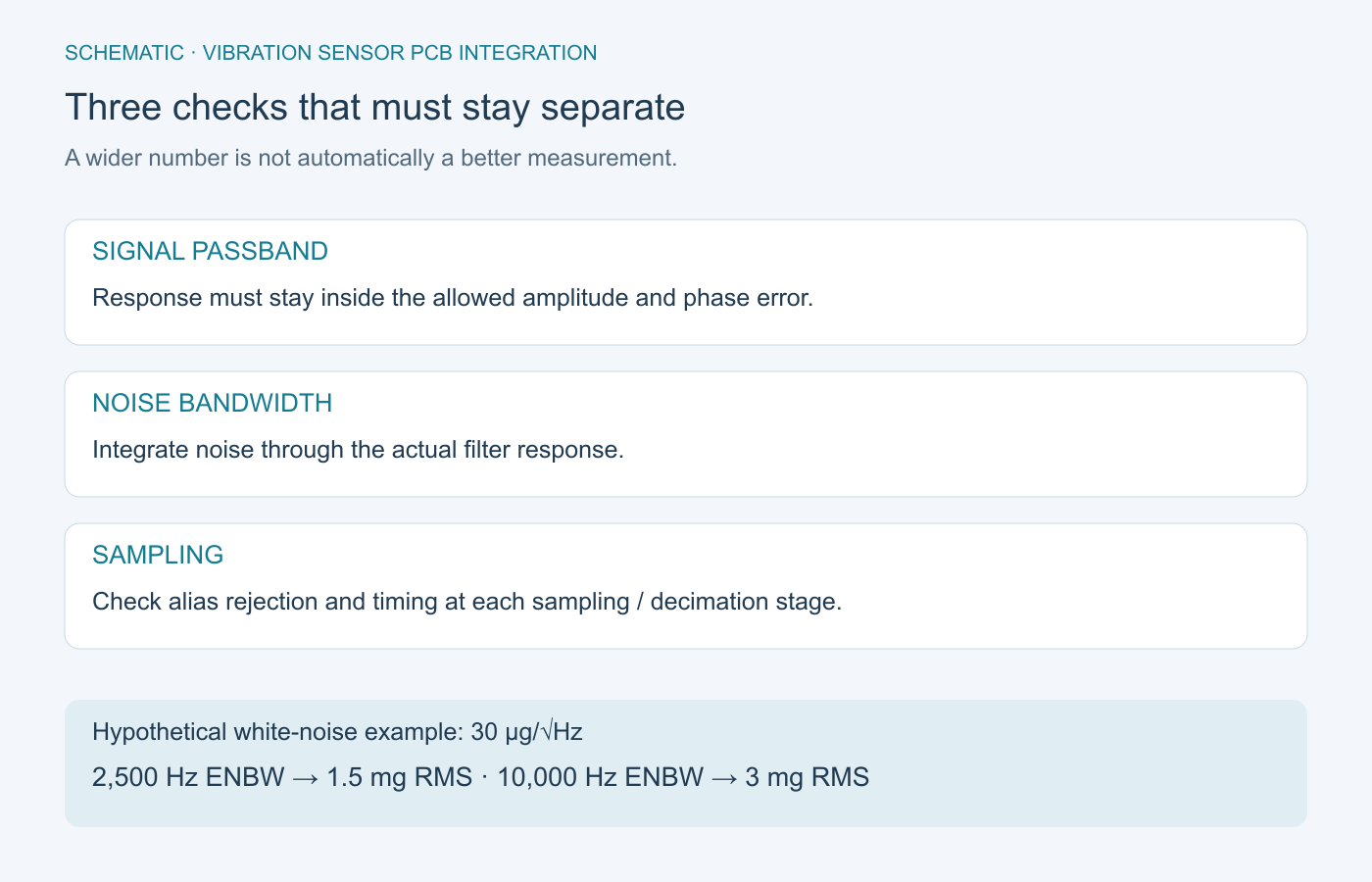
Compare integrated noise in the intended measurement configuration. Noise density alone is not the smallest resolvable signal, and ADC bit count is not a complete noise specification.
The ADI noise-bandwidth explanation relates approximately white acceleration noise density to total RMS noise through the square root of equivalent noise bandwidth. Use the actual filter response to determine that bandwidth; it is not automatically the named cutoff frequency.
As a hypothetical screening example, assume a flat input-referred noise density of 30 µg/√Hz over the relevant band. An equivalent noise bandwidth of 2,500 Hz gives approximately 1,500 µg, or 1.5 mg RMS. Increasing that bandwidth to 10,000 Hz gives approximately 3 mg RMS. This is a simplified sensor-noise calculation, not measured performance or a complete system budget.
Add front-end, reference, converter, and coupled interference contributions on a consistent input-referred basis. Combine independent random noise through a power sum where justified; investigate coherent interference separately. Retain enough range for offset and the largest required signal rather than spending all available headroom on nominal sensitivity.
When the budget changes the assembly process or test fixture, share the sensor interface and noise requirements with the schematic, relevant layout, cable definition, proposed limits, and build quantity. OrinewPCB can review the requested assembly and test scope; specialized low-noise characterization needs an explicitly agreed method.
Check filtering before the first irreversible sampling step
Review the full frequency response before accepting a sample rate. A filter applied after an unwanted signal has aliased into the measurement band cannot identify and remove that signal simply because it originated at a higher frequency.
The ADXL1001/ADXL1002 data sheet, Revision A, gives a useful warning against loose bandwidth language: it lists a 5% response bandwidth of 4.7 kHz and a 3 dB response point of 11 kHz. These are different criteria, not interchangeable descriptions of flat accuracy. The same document discusses out-of-band amplifier noise and the need to coordinate external filtering with conversion.
For digital sensors, inspect the internal analog and digital stages as well as any host processing. The ADXL354/ADXL355 data sheet, Revision D, documents filter settings, output data rate, and associated delay. A fast serial clock does not mean that new acceleration samples arrive at that rate.
Turn those facts into a configuration record: selected range, output rate, filter settings, synchronization method, and host decimation. Verify data continuity when communications, logging, and other processor tasks run together. For multichannel comparisons, include relative delay and timing consistency, not only amplitude.
Reserve a test for disturbances outside the desired band. A passband-only sweep can miss the reason a field spectrum develops an unexpected low-frequency peak. Define the stimulus, permitted response, and observation method without assuming a generic filter order is sufficient.
Include the PCB mounting in the measurement path
The sensor measures motion at its own location. If the board or mounting flexes, that motion can differ from the machine surface the system is intended to observe.
The ADXL1001/ADXL1002 mounting guidance recommends placement near a hard board mounting point to reduce errors from unsupported PCB vibration. Treat that as a design consideration to verify in the installed structure, not a guarantee that adding a screw removes every resonance.
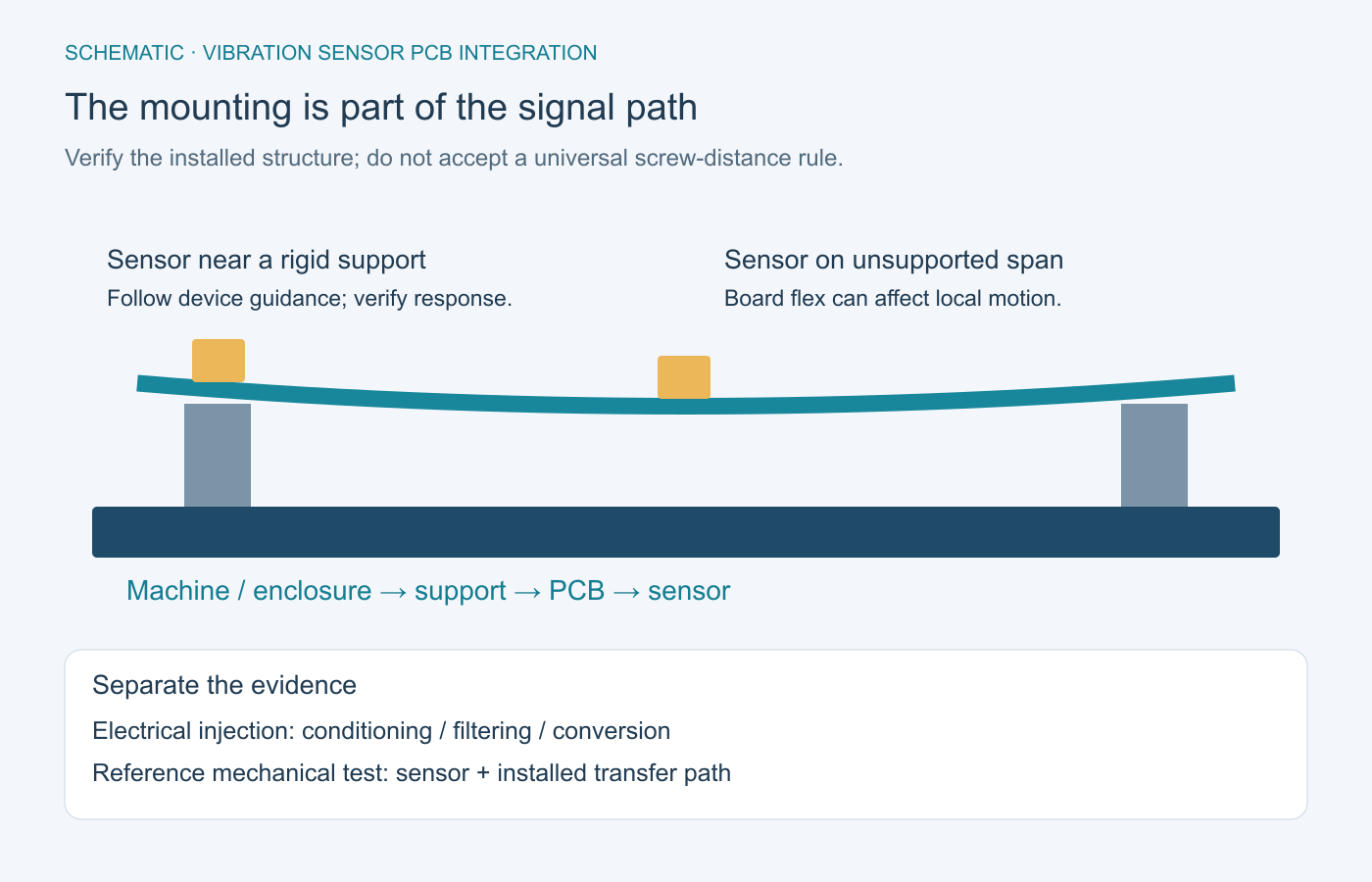
Control board support, enclosure contact, fasteners, sensor orientation, and cable restraint in the mechanical definition. Record the final configuration used for characterization. Changing an enclosure bracket or moving the sensor can change the response even when the electrical BOM stays the same.
Use the PCB assembly drawing checklist to communicate orientation and assembly details that the component list cannot express. Distinguish package pin-one orientation from the physical sensing-axis direction. Confirm the installed axis convention in firmware and in the reported data.
Use acceptance tests that separate electrical and mechanical errors
Separate electrical-path verification from mechanical-response verification. This makes a failed result easier to diagnose and prevents one successful test from being used as evidence for a different requirement.
| Check | What it can establish | What remains outside that evidence |
|---|---|---|
| Appropriate electrical injection or sensor simulation | Conditioning gain, bias handling, filtering, and conversion behavior for the defined stimulus. | The sensor’s mechanical sensitivity and the installed transfer path. |
| Configuration and continuous data capture | Range/filter settings, sample continuity, timing, and conversion to engineering units. | Absolute vibration accuracy without a qualified reference. |
| Reference mechanical excitation | Installed response across the approved frequencies, amplitudes, axes, and fixture configuration. | Unexamined installation changes or a different operating environment. |
| Agreed production screening | The manufacturing defects and functional limits covered by the released procedure. | Every aspect of design qualification or a field diagnostic claim. |
The PCB test-planning guide helps assign methods, fixtures, limits, and retained records. The assembly environmental-test guide addresses a separate question: whether the installed assembly withstands its specified exposure. Surviving a vibration test and accurately measuring vibration are different acceptance goals.
Decide who supplies the reference sensor, excitation equipment, calibration records, firmware, and analysis procedure. State which checks are characterization, sampled acceptance, or every-unit screening. Preserve failed records and define retest rules before production begins.
Release the sensor, assembly, and test configuration together
Choose piezo or MEMS vibration sensors by the evidence available for the complete measurement chain. Release the sensor model and interface, usable band, noise allowance, filtering, mounting, and acceptance configuration as one controlled design decision.
Compare suppliers against that same scope. The full-turnkey PCB assembly scope connects fabrication, sourcing, and assembly; sensor calibration and specialized vibration characterization must be separately defined rather than assumed to be included.
For a manufacturing project, provide the vibration-board build and test package through OrinewPCB’s inquiry form. Include fabrication files, BOM, placement data, assembly drawings, quantity, firmware/configuration requirements, and the agreed test limits so sourcing, assembly, and requested verification can be assessed together.
Technical sources accessed October 21, 2026. Device examples use ADXL1001/ADXL1002 Revision A and ADXL354/ADXL355 Revision D; verify the current documents for the exact released parts.
Latest Blog
Contact Info
Phone: +86-755-82882936
Email: [email protected]
WhatsApp: +86-13570802455
Wechat: +86-13570802455
Address: 2nd floor,D Bldg.,Electric Link Technology Bldg.,Gongming,Guangming New Dist.,518106 Shenzhen, China